GoHighLevel SaaS Mode Setup: What Agencies Need Before Selling CRM
Many marketing agencies eventually reach a point where they want to offer more than services.
Instead of only selling lead generation, advertising, websites, or automation, an agency can package CRM, marketing automation, funnels, appointment booking, and follow-up into a recurring software-based offer.
This is where GoHighLevel SaaS Mode can become valuable.
GoHighLevel’s SaaS Configurator allows agencies to package platform access into recurring SaaS plans, define pricing and features, configure snapshots and add-ons, and sell those plans to customers. HighLevel currently supports two SaaS billing architectures: SaaS V1 and SaaS V2, which differ in how billing and subscriptions are managed.
But activating SaaS Mode should not be the first step.
Before selling CRM subscriptions to clients, an agency needs to think about its offer, account structure, pricing, snapshots, onboarding, permissions, support, billing, and ongoing management.
This guide explains what agencies should prepare before launching a GoHighLevel SaaS offer.
What Is GoHighLevel SaaS Mode?
GoHighLevel SaaS Mode allows agencies to package GoHighLevel’s software capabilities into recurring plans that can be sold to clients.
Instead of saying:
“We use GoHighLevel for our clients.”
The agency can create an offer such as:
CRM + Automation + Appointment Booking + Lead Follow-Up
and sell that solution as a recurring subscription.
The SaaS Configurator is designed to centralize important parts of this process, including plan creation, pricing, features, snapshots, add-ons, trials, credits, and usage-based billing.
This can allow an agency to move toward a more productized business model.
For example:
Client Signs Up → SaaS Plan Purchased → Sub-Account Created → Snapshot Applied → Features Activated → Client Onboarded → CRM + Automation Goes Live
The objective is to make that process repeatable.
SaaS Mode vs. White-Label GoHighLevel
SaaS Mode and white-labeling are related, but they are not the same thing.
White-labeling focuses on the branded client experience.
SaaS Mode focuses on packaging and selling software access through recurring plans.
An agency can therefore think about the two layers separately:
White-Label
How the platform looks and feels to the client
SaaS
How the agency packages, sells, provisions, and manages the software offer
If you are building the white-label foundation first, see:
GoHighLevel White-Label Setup for Agencies: What You Need to Launch. That article should serve as the foundation before moving into the SaaS model.
Why Agencies Use GoHighLevel SaaS Mode
The biggest attraction is the ability to turn technology into a recurring offer.
Instead of relying entirely on one-time implementation projects, an agency can potentially create recurring revenue from:
- CRM access
- Automation
- Appointment booking
- Funnels
- Lead management
- Communication tools
- Reporting
- Additional features
- Usage-based services
- Ongoing management
For example, an agency serving HVAC companies could offer:
HVAC Growth CRM
Including:
- Lead pipeline
- Missed-call text-back
- Appointment booking
- Lead follow-up
- Review requests
- Automated reminders
- Reporting
The agency can then charge a recurring fee for the system and optionally sell additional services around it.
This is a very different business model from simply charging for a website project.
What You Need Before Setting Up SaaS Mode
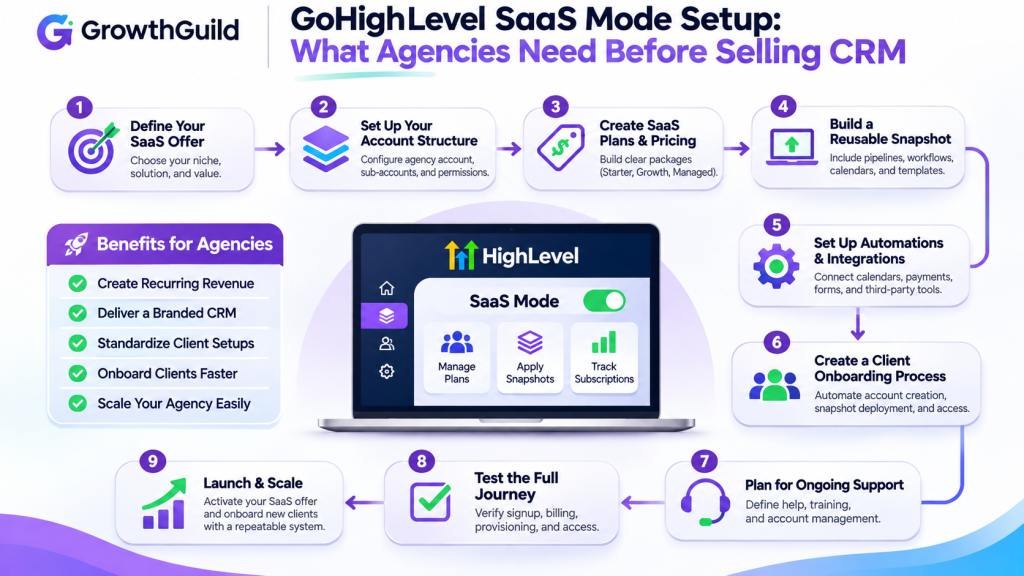
1. Define Your SaaS Offer First
Don’t start by configuring the software.
Start with the product.
Ask:
- Who is this for?
- What problem does it solve?
- What does the customer receive?
- Why should they pay every month?
For example:
Starter CRM
- CRM
- Basic pipeline
- Contact management
- Appointment calendar
Growth CRM
- CRM
- Automation
- SMS/email follow-up
- Appointment booking
- Reporting
Managed CRM
- Everything in Growth
- Workflow management
- CRM optimization
- Technical support
- Ongoing account management
The exact packages depend on your market.
The important thing is that your SaaS plan should solve a specific business problem.
2. Understand Your SaaS Billing Architecture
HighLevel currently supports SaaS V1 and SaaS V2.
They are separate billing architectures rather than simple versions where one automatically replaces the other.
Under the current setup:
- SaaS V1 uses Stripe as the system of record.
- SaaS V2 uses HighLevel through a selected Agency Sub-Account as the billing system of record.
- The available payment-provider options and configuration depend on the architecture you choose.
This distinction matters because your billing setup affects how plans, subscriptions, payment providers, and client accounts are managed.
Before launching, understand which architecture fits your agency’s requirements.
Do not choose an architecture simply because another agency is using it.
Your payment setup, existing subscriptions, client structure, and operational requirements should influence the decision.
3. Set Up the Correct Agency Sub-Account
For agencies using SaaS V2, the Agency Sub-Account can act as the operational hub for SaaS products, subscriptions, payment-provider connections, and related billing configuration.
This is important because agencies can accidentally create confusion by mixing their own internal account with client accounts.
Your structure should clearly distinguish:
Agency Operations from Client Businesses
For example:
Agency → SaaS Management → Billing → Plan Configuration → Internal Operations
Client Sub-Accounts → Client CRM → Client Pipelines → Client Workflows → Client Data
This separation makes the environment easier to manage as your client base grows.
4. Create Your SaaS Plans Carefully
Your SaaS plan is essentially your product package.
HighLevel’s current SaaS Configurator allows agencies to configure plan pricing, features, snapshots, add-ons, Marketplace apps, trials, credits, and usage billing where applicable.
Before publishing a plan, determine:
- Plan name
- Monthly price
- Annual price, if applicable
- Included features
- Snapshot
- Add-ons
- Usage billing
- Trial
- Credits
- Customer permissions
- Upgrade path
- Downgrade path
Don’t create ten plans just because the platform gives you the ability to do so.
Start with a small number of clearly differentiated offers.
5. Build a Reusable Snapshot
Snapshots are extremely important for a scalable SaaS model.
A snapshot allows an agency to reuse a configured account structure across other sub-accounts.
HighLevel’s documentation describes snapshots as reusable templates that can include assets such as workflows, funnels, calendars, forms, custom fields, and other configuration.
For example, suppose you build a CRM specifically for HVAC businesses.
Your source account could contain:
- HVAC pipeline
- Lead qualification form
- Missed-call workflow
- Appointment reminders
- Estimate follow-up
- Review request automation
- Custom fields
- Calendars
- Email templates
- SMS templates
You can then use that configuration as the foundation for new client accounts.
This is one of the biggest differences between a scalable SaaS operation and manually building every account from scratch.
6. Design the Client Onboarding Process
Your SaaS model should make client onboarding predictable.
A basic process might look like:
Purchase → Payment Confirmed → Account Created → Snapshot Applied → Plan Features Activated → Welcome Email → Onboarding Form → Business Information Collected → Calendar / Domain / Integrations Configured → Client Ready
The more of this process you can standardize, the less manual work your team has to perform.
HighLevel’s current SaaS Configurator supports automated onboarding flows that can provision client sub-accounts and apply snapshots after successful SaaS checkout.
However, automated provisioning does not eliminate the need for a well-designed onboarding process.
Your team still needs to determine what information the client must provide and what configuration should happen after the account is created.
7. Decide Which Features Each Plan Includes
Not every client should necessarily receive access to every feature.
HighLevel allows agencies to define feature access as part of SaaS plan configuration. Sub-account-level permissions can control which features are available, while individual user permissions can further restrict access.
For example:
Basic Plan
CRM + Pipeline + Calendar
Growth Plan
CRM + Automation + Calendar + Communication
Premium Plan
CRM + Automation + Advanced Features + Additional Support
This creates clearer differentiation between plans.
It also prevents you from giving every customer access to features they don’t need.
8. Think About Rebilling and Usage Costs
SaaS pricing is not only about the subscription fee.
Depending on your offer, you may also have usage-based costs associated with services such as communications or AI.
HighLevel’s current billing documentation describes rebilling as a way for agencies to pass supported ongoing costs to sub-accounts, with supported configurations allowing agencies to rebill at cost or, on eligible plans, with a markup.
Before launching, calculate your actual costs.
For example:
Client pays: $297/month
Potential costs may include:
- Platform costs
- Phone usage
- Email usage
- AI usage
- Marketplace apps
- Support
- Payment processing
- Internal account management
Your pricing should leave enough margin to support the client profitably.
9. Decide Who Handles Support
Software subscriptions create an expectation of ongoing support.
Before selling your SaaS offer, determine:
- Who answers client questions?
- Who fixes workflow problems?
- Who manages integrations?
- Who handles account changes?
- Who monitors system failures?
You could offer different support levels.
Self-Service
Client manages most of the platform independently.
Assisted
Client receives technical support when required.
Managed
Your team manages CRM, workflows, automation, and ongoing optimization.
This distinction can become part of your pricing strategy.
10. Create an Upgrade and Downgrade Strategy
A SaaS model should make it clear what happens when a client changes plans.
For example:
Starter → Growth
The client receives additional automation and communication features.
Growth → Managed
The client receives ongoing technical management.
Think about:
- What happens to existing workflows?
- Which features become available?
- Which features are removed?
- What happens to billing?
- What happens to add-ons?
- Does the client need assistance?
HighLevel’s current SaaS architecture supports plan-management workflows, but the behavior can differ between V1 and V2, so your plan structure should be designed carefully before launch.
11. Test the Purchase-to-Onboarding Journey
Before sending your SaaS offer to real customers, test the entire journey.
Don’t test only the checkout.
Test:
Landing Page → Checkout → Payment → Subscription → Account Creation → Snapshot → Feature Access → Welcome Email → Onboarding → Client Login → CRM Functionality
Test both successful and unsuccessful scenarios.
For example:
- Successful payment
- Failed payment
- Missing payment method
- Duplicate customer
- Incorrect plan
- Existing sub-account
- Upgrade
- Downgrade
- Cancellation
HighLevel’s documentation specifically notes that payment readiness and plan configuration should be reviewed before SaaS activation, particularly when managing multiple sub-accounts.
12. Document the System Before You Sell It
If only one person knows how your SaaS system works, scaling becomes risky.
Document:
- Plan structure
- Pricing
- Features
- Snapshots
- Workflows
- Integrations
- Billing
- Support process
- Client onboarding
- Upgrade process
- Cancellation process
- Troubleshooting procedures
Documentation allows another team member to understand and manage the system.
This becomes particularly important once your agency has dozens of SaaS customers.
How Much Should You Charge for a GoHighLevel SaaS Offer?
There is no universal price.
Your pricing should reflect:
- Target market
- Features
- Support
- Usage costs
- Automation
- Industry specialization
- Onboarding
- Account management
- Competitive positioning
- Desired profit margin
A generic CRM may be difficult to differentiate.
A specialized solution can be much easier to position.
For example:
Generic CRM
CRM software for businesses
versus:
HVAC Growth System
Lead capture, missed-call follow-up, appointment booking, CRM, and automated customer follow-up for HVAC companies.
The second offer has a much clearer business outcome.
Common GoHighLevel SaaS Mode Mistakes
Selling Before Building the Product
Don’t sell something you haven’t tested.
Making Plans Too Complicated
Customers should immediately understand what they are buying.
No Clear Niche
A niche-specific solution can often be easier to sell than a generic CRM.
Ignoring Usage Costs
Phone, email, AI, and other usage-related expenses can affect your margins.
No Support Model
Clients will need help eventually.
No Snapshot Strategy
Manual account creation makes scaling difficult.
Poor Onboarding
A SaaS subscription should not require weeks of manual configuration.
No Testing
A broken provisioning or billing process can create serious client problems.
GoHighLevel SaaS Mode vs. Traditional Agency Services
A traditional agency might sell:
- Website → $3,000
- SEO → $1,500/month
- Ads → $2,000/month
A SaaS-enabled agency can add:
CRM + Automation → $297/month
The important point isn’t that SaaS replaces agency services.
It can complement them.
For example:
SaaS CRM → Lead Generation → Media Buying → AI Follow-Up → Account Management
This creates a broader recurring relationship with the customer.
That model is particularly relevant for agencies that want to move from project-based work toward more predictable recurring revenue.
How GrowthGuild Can Help Agencies With GoHighLevel SaaS
Building a SaaS offer requires more than switching on SaaS Mode.
You need a clear product, scalable CRM architecture, reusable snapshots, automation, onboarding, billing logic, permissions, integrations, QA, and ongoing support.
GrowthGuild helps agencies build and manage GoHighLevel systems around their actual business processes.
Our GHL services include CRM and pipeline optimization, workflow automation, funnels, booking systems, email/SMS/WhatsApp automation, integrations, troubleshooting, training, and ongoing support.
If your agency is planning to launch a GoHighLevel SaaS offer, we can help you build the infrastructure behind it so your team isn’t manually rebuilding every client account.
Ready to Turn GoHighLevel Into a Scalable SaaS Offer?
GoHighLevel SaaS Mode can give agencies a way to package CRM and automation into recurring software offers but the technology is only one part of the equation.
Before you launch, make sure you have:
- A defined SaaS product
- Clear pricing
- A scalable account structure
- A reusable snapshot
- Automated onboarding
- Defined feature access
- A billing and usage strategy
- A support model
- Upgrade and cancellation processes
- A complete QA process
If you’re ready to build a GoHighLevel SaaS offer without creating a complicated system behind the scenes, GrowthGuild can help.
→ Talk to GrowthGuild about your GoHighLevel SaaS setup and build a scalable CRM product your agency can sell, manage, and grow.
FAQs
1. What is GoHighLevel SaaS Mode?
GoHighLevel SaaS Mode allows agencies to package GoHighLevel capabilities into recurring SaaS plans that can be sold and managed for clients.
2. What is needed to set up GoHighLevel SaaS Mode?
Agencies should define their offer, pricing, billing architecture, features, snapshots, onboarding process, permissions, support model, and client provisioning before selling SaaS plans.
3. What is the difference between GoHighLevel SaaS V1 and V2?
SaaS V1 uses Stripe as its billing system of record, while SaaS V2 uses HighLevel through an Agency Sub-Account. The two architectures have different billing and subscription workflows.
4. Can GoHighLevel SaaS plans use snapshots?
Yes. Snapshots can be included in SaaS plans so new client accounts can receive a reusable configuration during onboarding.
5. Can agencies make recurring revenue with GoHighLevel SaaS?
Yes. Agencies can package CRM and automation capabilities into recurring SaaS subscriptions and potentially add complementary services such as implementation, support, lead generation, or account management.