How to Build an AI Appointment Booking Agent in GoHighLevel
Businesses lose potential customers every day because calls go unanswered, leads are not followed up with quickly, or prospects cannot find a convenient time to schedule an appointment.
An AI appointment booking system can solve much of this problem by allowing an AI agent to communicate with prospects, answer common questions, collect information, check availability, and schedule appointments automatically.
With GoHighLevel CRM, businesses can connect AI-powered conversations with calendars, contact records, workflows, and follow-up automation. This creates a complete process where a prospect can move from an initial phone call to a confirmed appointment without requiring a team member to manually handle every step.
HighLevel currently supports appointment booking through Voice AI, including single-calendar and multi-calendar booking. The agent can use configured calendar availability, collect missing information, and confirm appointments during a live conversation.
Here is how to build the system.
What Is an AI Appointment Booking Agent?
An AI appointment-booking agent is an AI-powered assistant that communicates with leads or customers and helps them schedule an appointment.
Instead of simply answering questions, the agent can perform actions during the conversation.
For example:
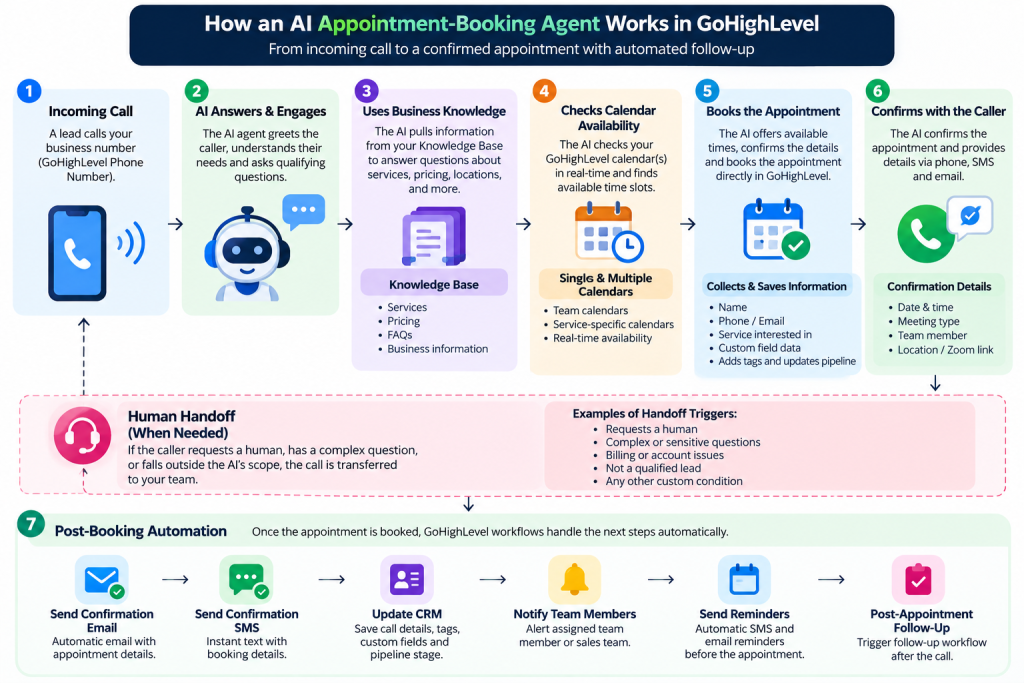
Customer calls → AI answers → Understands request → Collects information → Checks calendar → Offers available times → Books appointment → Confirms booking → Triggers follow-up
This makes AI appointment booking particularly useful for businesses that receive a high volume of calls or generate leads outside normal business hours.
Common use cases include:
- Sales consultations
- Discovery calls
- Dental appointments
- Medical appointments
- Home-service estimates
- Real estate consultations
- Coaching calls
- Demonstrations
- New-client consultations
Step 1: Define What the AI Agent Should Do
Before opening GoHighLevel, define the purpose of the agent.
Do not start by simply telling the AI to “book appointments.” Give it a specific role.
For example:
“You are the appointment coordinator for a digital marketing agency. Your job is to understand why the caller is contacting us, answer basic questions about our services, collect their contact information, and schedule a discovery call when appropriate.”
Your instructions should define:
- The agent’s role
- What information it should collect
- Which questions it can answer
- What services it represents
- When it should book
- When it should transfer to a human
- Topics it should avoid
- How the conversation should end
Clear instructions reduce unexpected behaviour and make the agent easier to test.
Step 2: Prepare Your GoHighLevel CRM
Your GoHighLevel CRM should be properly configured before connecting the AI agent.
At minimum, review your:
- Contacts
- Custom fields
- Calendars
- Pipelines
- Appointment settings
- Team members
- Workflows
- Phone numbers
If your AI agent is qualifying leads, create the appropriate custom fields before launch.
For example:
- Service Interested In
- Budget Range
- Business Type
- Lead Qualification
- Appointment Type
This allows information collected during the conversation to become useful CRM data rather than remaining only inside a call transcript.
Step 3: Create Your Booking Calendar
Your calendar is the foundation of AI appointment booking.
Before connecting it to Voice AI, configure:
- Appointment duration
- Business availability
- Buffer times
- Minimum notice
- Conflict settings
- Team member assignment
- Calendar notifications
Make sure the calendar reflects your actual availability.
If your team is available from 9 AM to 5 PM but the calendar allows appointments outside those hours, the AI could offer times that do not make operational sense.
HighLevel’s current Voice AI documentation also distinguishes AI working hours from calendar availability. The agent’s working hours determine when it handles calls, while the calendar determines which appointment times are actually available.
Step 4: Create the Voice AI Agent
Inside your HighLevel sub-account, go to:
AI Agents → Voice AI
Create a new agent and choose the appropriate creation method.
Depending on your requirements, HighLevel currently provides options including:
- Custom Agent
- Marketplace agent
- Flow Based Builder
For a straightforward appointment-booking system, a custom agent is often a good starting point.
Configure the core settings, including:
- Agent name
- Voice
- Language
- Model
- Timezone
- Welcome message
- Agent prompt
The timezone is particularly important for appointment scheduling.
Step 5: Give the Agent Business Knowledge
An AI appointment booking agent should not have to guess answers about your business.
Connect an appropriate Knowledge Base containing information such as:
- Services
- Business hours
- Locations
- Pricing information
- Policies
- Frequently asked questions
- Appointment information
For example, if someone asks:
“Do you offer SEO services for local businesses?”
the agent should have approved information available to answer accurately.
The Knowledge Base should complement your prompt rather than replace it.
Your prompt defines how the agent behaves, while the Knowledge Base provides approved business information it can use during conversations.
Step 6: Add the Appointment Booking Action
Now connect the AI agent to your calendar.
Inside the Voice AI agent, open Actions, select New Action, and choose Appointment Booking.
You can configure the agent to use a single calendar or, where appropriate, multiple eligible calendars.
Single Calendar
Single-calendar booking works well when every caller should book the same appointment type.
For example:
AI Agent → Discovery Call Calendar
This is a simple setup for agencies, consultants, and service businesses where one appointment type handles most qualified leads.
Multiple Calendars
Multiple-calendar booking becomes useful when different services require different appointment types.
For example:
- SEO Consultation → SEO Calendar
- CRM Consultation → CRM Calendar
- Paid Ads Consultation → Media Buying Calendar
The AI can use the conversation’s context and caller intent to determine which eligible calendar best matches the request.
This can create a much more natural experience than forcing callers through a rigid menu.
Step 7: Configure Calendar Selection Carefully
If you use multiple calendars, give each calendar a clear description.
For example:
CRM Consultation: For businesses interested in GoHighLevel CRM setup, workflows, integrations, and automation.
SEO Consultation: For businesses looking for technical SEO, local SEO, content strategy, and search visibility.
Avoid overlapping descriptions.
If two calendars sound almost identical, the AI may have difficulty determining which one is the correct option.
You can also establish fallback behaviour for requests that do not clearly match one of your calendars.
Step 8: Collect the Right Information Before Booking
Do not make the AI ask unnecessary questions.
Collect only information that is actually useful for qualification or appointment preparation.
For example:
- What service are you interested in?
- What is your main challenge?
- What type of business do you operate?
- What is your preferred timeframe?
- What is the best email address for confirmation?
The agent can then save relevant information to the contact record and use it to guide the booking process.
This is where GoHighLevel CRM becomes more powerful than simply using an AI phone answering service. The conversation can become part of a broader lead-management system.
Step 9: Create Post-Booking Automation
Booking the appointment is not the end of the process.
Once an appointment is created, use GoHighLevel workflows to continue the customer journey.
For example:
Appointment Booked
↓
Send confirmation SMS
↓
Send confirmation email
↓
Update CRM pipeline
↓
Notify assigned team member
↓
Send reminder
↓
Appointment occurs
↓
Trigger post-appointment follow up
You can also use post-call information to create internal tasks or update contact records.
This turns AI appointment booking into a complete sales automation system rather than an isolated scheduling tool.
Step 10: Configure Human Handoff
AI should not handle every situation.
Create clear rules for when the conversation should be transferred to a human.
Examples include:
- Customer requests a human
- Complex billing question
- Complaint
- Sensitive issue
- Question outside the Knowledge Base
- High-value opportunity requiring a sales representative
A good AI agent knows its limits.
The objective is not to prevent humans from becoming involved. It is to allow the AI to handle routine conversations while escalating situations that require human judgement.
Step 11: Test the Agent Before Going Live
Never deploy an AI appointment booking system without testing it extensively.
Test common scenarios such as:
Basic Booking
“I’d like to schedule a consultation.”
Service-Specific Request
“I need help with GoHighLevel automation.”
Multiple Calendar Request
“I want to discuss SEO, but I’m also interested in your CRM services.”
Unavailable Time
“I need an appointment tomorrow at 3 PM.”
Missing Information
The caller refuses to provide an email address.
Human Transfer
“Can I speak with someone?”
Unknown Question
Ask something that is not contained in the Knowledge Base.
You should also test interruptions, unclear requests, silence, and unexpected responses.
Review transcripts, recordings, summaries, and action results after testing.
Step 12: Monitor and Improve Performance
Launching the agent is only the beginning.
Review conversations regularly and look for:
- Questions the AI could not answer
- Incorrect responses
- Failed bookings
- Wrong calendar selection
- Unnecessary questions
- Poor escalation behaviour
- Prospects abandoning the conversation
Use these observations to improve the prompt, Knowledge Base, calendar descriptions, and workflow logic.
The best AI agents are continuously refined based on real conversations.
Here you can check: GoHighLevel Workflow Mistakes That Cause Duplicate Messages and Broken Automations
Common AI Appointment Booking Mistakes
Avoid these common problems:
Making the Prompt Too Complicated
Give the agent clear rules instead of hundreds of conflicting instructions.
Connecting the Wrong Calendar
Always verify availability, team assignments, and appointment duration.
Using Poor Knowledge Base Content
Outdated business information can result in inaccurate answers.
Asking Too Many Questions
Qualification should support the booking process, not create unnecessary friction.
Not Creating Human Escalation Rules
The AI needs to know when it should stop and involve a team member.
Skipping Testing
A workflow that looks correct in the builder may behave differently during real conversations.
Why Work With a GoHighLevel Expert?
Building an AI agent is only one part of the implementation.
A complete system may involve:
AI Agent + GoHighLevel CRM + Calendar + Pipeline + Workflows + Lead Qualification + Follow-Up
A GoHighLevel expert can help design these components as one connected system.
Instead of creating an AI agent that simply answers calls, you can build a system that captures lead information, qualifies prospects, books appointments, updates the CRM, alerts your team, and triggers follow-up automatically.
Final Thoughts
AI appointment booking can significantly reduce the friction between a prospect showing interest and actually getting onto your calendar.
With GoHighLevel, businesses can connect AI-powered conversations with calendars, CRM records, workflows, and follow-up systems to create a more complete customer journey.
The key is not simply turning on an AI agent. The real value comes from designing the conversation, calendar logic, CRM structure, qualification process, human handoff, and automation together.
GrowthGuild helps businesses and agencies build GoHighLevel CRM systems, AI voice agents, appointment-booking workflows, lead qualification systems, and marketing automations.
Ready to turn missed calls and slow follow-ups into booked appointments? Contact GrowthGuild to build your AI appointment-booking system.
FAQs
1. What is AI appointment booking?
AI appointment booking uses an AI agent to communicate with prospects, check calendar availability, and schedule appointments automatically.
2. Can GoHighLevel book appointments with AI?
Yes. GoHighLevel Voice AI can use an Appointment Booking action to offer available times and schedule appointments during calls.
3. Can GoHighLevel AI use multiple calendars?
Yes. Voice AI can route callers across eligible calendars based on the service or intent identified during the conversation.
4. Can an AI appointment agent qualify leads?
Yes. The agent can collect information and use it to qualify, route, and prepare leads before or during the booking process.
5. Do I need a GoHighLevel expert to build an AI booking agent?
Not necessarily, but an experienced GoHighLevel expert can help connect the AI agent, CRM, calendars, workflows, qualification, and follow-up into one reliable system.